ScrapFactory & Adding Expansion Packs
If there is a video on adding expansion packs it will be above here.
Instructions
This page will hopefully help you in adding Expansion Packs that you have purchased. By default the software should come with two codes for you to enter. We made it easy for you to add them. And if you forget what the codes are you can get them from the help menu for the Intial Set and the Bear Bodies.
- Click on the Add Expansion Packs button
- Choose to Manually Enter Code
- Type in your expansion pack code
- Accepted - Modal Displayed
- You can repeate the process for the Bears or any other expansion pack that you purchase from ScrappyDew.com.
You will find that we have a button in the lower left called "Add Expansion Pack." You will want to click on that button first.
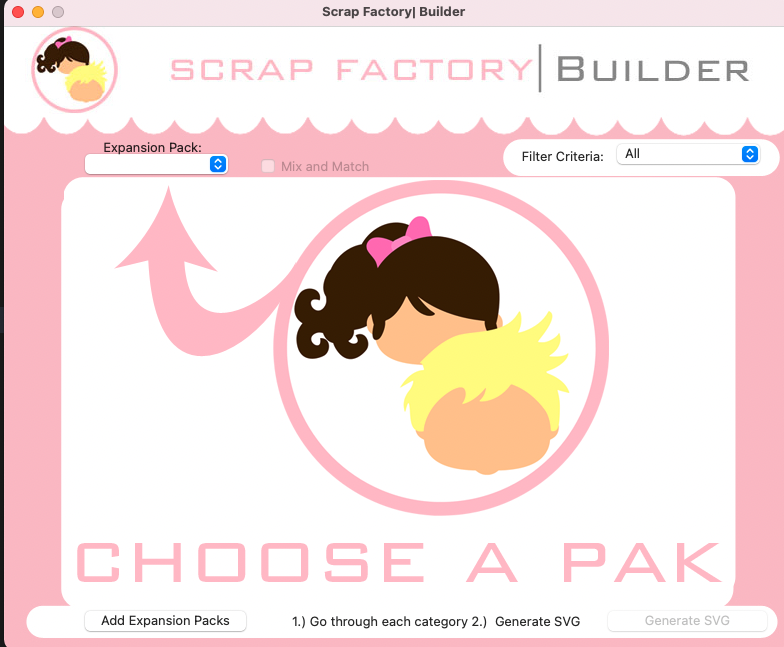

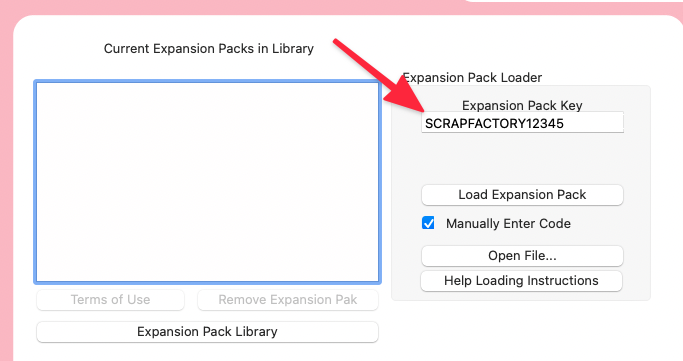
Sometimes it is easier to just type the code into the text field. But in order to get the text field to appear you will have to put a checkmark on the Manually Enter Code box. That way we can type in
The arrow is pointing to the new field box that you should see once you click the checkmark of Manually Enter Code. To get the basic standard expansion pack you can type in the following SCRAPFACTORY12345.
Information about the expansion pack code that you get from purchases. The codes should all be in CAP LETTERS and some may contain numbers too. We have tried to ensure that you will not mistake an L for a 1 for example.
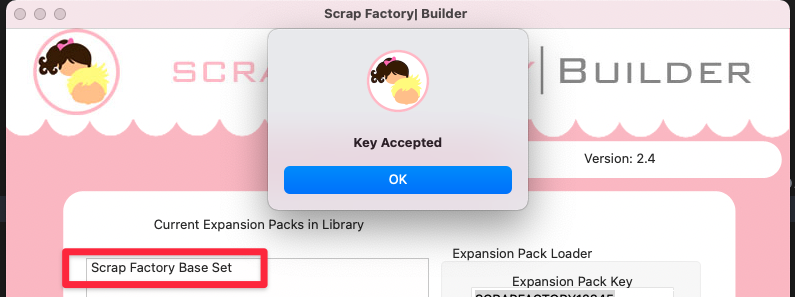
You should see a success window popup and your newly added expansion pack added to the list.
The standard ScrapFactory do come with Bear Bodies too. We are goign to repeat the steps for adding the bear bodies too. You will want to type in the field SFBEARS
